How to Track Inbound Leads from AI Recommendations (GA4, Form Fields, and What the Data Is Telling You)
Executive Summary
AI tools like ChatGPT and Perplexity are sending inbound leads to your website right now. Most businesses have no idea. GA4 buries this traffic inside generic "Referral" or misfiles it as "Direct," making an entire acquisition channel invisible. This article shows you exactly how to surface it, measure it, and act on it.
- AI-referred traffic converts at up to 16% — nearly nine times higher than Google Organic — making it the highest-intent inbound channel most teams aren't measuring.
- GA4 has no native AI channel. Without a custom channel group, sessions from ChatGPT, Perplexity, and Gemini are scattered across Referral and Direct, invisible in your standard reports.
- "How did you find us?" form fields capture the attribution GA4 can't — including dark traffic from mobile AI apps where referrer data is stripped entirely.
- Businesses that build this tracking infrastructure now will have a compounding data advantage as AI referral volume grows. The ones that wait start from zero in a more competitive landscape.
The Channel Your Analytics Aren't Showing You
A prospect types "best AI visibility agency for B2B SaaS" into ChatGPT. ChatGPT recommends your company by name. The prospect clicks through, reads your site, and books a call.
Your GA4 report shows it as "Direct."
This is happening at scale. According to a 2025 study by SE Ranking, visitors referred by AI platforms spend 68% more time on websites than those from traditional organic search. AI tools act as intent filters, sending people who are already deep in the decision process. They're not browsing. They're evaluating.
The conversion numbers are striking. A case study by Seer Interactive found that traffic referred from ChatGPT converts at 16%, compared to 1.8% from Google Organic. That's nearly nine times higher. The volume is still small relative to total traffic, but the quality signal is extraordinary.
Yet most businesses are flying blind on this channel. GA4 was built for a world of search engines, social platforms, and email campaigns. There is no native "AI" channel. When ChatGPT sends someone to your site, GA4 does one of two things:
- If the referrer header is passed (typical on desktop), it files the session under generic "Referral" alongside forum backlinks and directory listings.
- If the referrer is stripped (common in mobile apps and in-app browsers), it records the session as "Direct," indistinguishable from someone typing your URL.
The result is that one of your fastest-growing inbound channels is invisible in your standard reports.
"There is no row in GA4 that says 'AI Traffic' by default. That's where a custom channel grouping comes in." — MeasureU
The good news: fixing this takes about 15 minutes. The better news: once you fix it, you'll also understand which AI engines are sending you the most qualified traffic, and you can start optimizing for them.
Why This Matters Now: The AI Referral Traffic Landscape
Before diving into the setup, it's worth understanding the scale of what's already happening.
ChatGPT now has 900 million weekly active users as of early 2026, more than double the 400 million reported a year earlier. It holds the #10 global domain ranking, ahead of Amazon, Instagram, and YouTube. ChatGPT accounts for roughly 78% of all AI-driven referral traffic worldwide.
Perplexity is the second-largest source, driving 15% of global AI traffic and nearly 20% in the United States. Gemini is growing fast: its referral traffic surged 388% year-over-year between September and November 2025, according to Similarweb data reported by Digiday.
The Quality vs. Volume Equation
Total AI referral volume is still modest. Across 10 major industries, AI platforms drive roughly 1% of overall web traffic, according to research by Conductor. That number will feel small until you look at what that traffic does when it arrives.
Traffic Source | Sign-up Conversion Rate |
|---|---|
LLM / AI referral | 1.66% |
Social media | 0.46% |
Organic search | 0.15% |
Direct | 0.13% |
Source: Microsoft Clarity analysis of 1,200+ publisher websites
LLM-referred visitors convert to sign-ups at more than 10 times the rate of organic search visitors. For subscription conversions, the gap is similar: LLM traffic converts at 1.34%, compared to 0.55% for search.
This is the intent filter effect. When someone asks ChatGPT "which agency should I hire for AI search optimization," they're not in research mode. They've already decided to act. They're asking for a recommendation. The AI gives them one. If your brand is in that answer, the visitor who clicks through is pre-sold in a way that a Google click-through almost never is.
Which AI Engines Should You Track?
Not all AI platforms pass referrer data equally. Here's the practical breakdown:
- ChatGPT (chatgpt.com / chat.openai.com): Largest source by far. Passes referrer on desktop. Mobile app often strips it.
- Perplexity (perplexity.ai): Strong North American user base. Consistent referrer passing. Highly engaged traffic.
- Gemini (gemini.google.com): Fast-growing. Passes referrer reliably on desktop.
- Microsoft Copilot (copilot.microsoft.com): Embedded in Windows and Edge. Referrer passing is inconsistent.
- Claude (claude.ai): Smaller share but growing. Anthropic's crawl-to-referral ratio is extremely high, meaning it sends far less traffic than it crawls.
Track all five. The channel group you're about to build will capture them all in one row.
Step 1: Build a Custom AI Channel Group in GA4
This is the foundational fix. It takes 15 minutes and gives you a dedicated "AI Traffic" row in your acquisition reports from that point forward. It does not recover historical data, but it starts your baseline immediately.
Create the Channel Group
- In GA4, click Admin (the cog icon, bottom-left of the screen).
- Under Data display, click Channel groups.
- Click Create new channel group (top right).
- Name it something clear: "AI Search" or "AI Traffic" works well.
Add the AI Channel with Regex Matching
- Click Add new channel.
- Name the channel AI Search.
- Under conditions, set one rule:
- Dimension: Source
- Match type: Matches regex
- Value: paste the regex below
chatgpt\.com|chat\.openai\.com|perplexity\.ai|claude\.ai|gemini\.google\.com|copilot\.microsoft\.com|grok\.x\.com|mistral\.ai|you\.com|phind\.com|deepai\.org|anthropic\.com
- Do not restrict the medium to "referral." Leaving the medium unrestricted is critical. Constraining to
medium = referralcauses you to miss ChatGPT sessions that arrive aschatgpt.com / (none)orchatgpt.com / (not set). Based on real-world data, this represents 30-40% of visible ChatGPT traffic. - Click Save channel.
Get the Channel Order Right
This is where most setups fail. GA4 evaluates channel rules top to bottom. The first matching rule wins. If your new AI Search channel sits below "Referral" in the list, the broader Referral rule claims AI traffic first and your new channel never fires.
- Back on the channel group screen, click Reorder.
- Drag AI Search to the very top of the list, above Organic Search, Direct, and Referral.
- Click Apply, then Save Group.
View Your Data
Allow 24-48 hours for GA4 to reprocess. Then go to:
Reports → Acquisition → Traffic Acquisition
At the top-left of the table, change the channel grouping dropdown from "Session default channel group" to your new custom group. You'll now see AI Search as its own row.
What you're looking at: sessions, engaged sessions, conversions, and revenue attributed to AI referrals. Segment by source to see which AI platform is driving the most traffic. Compare conversion rates across AI platforms vs. organic search.
Step 2: Check Your Referral Report for Existing AI Traffic
Before your new channel group is fully populated, check what AI traffic is already sitting in your existing Referral data. You may have months of unattributed AI sessions hiding in plain sight.
Build a Dedicated Referral Report
- Go to Reports → Library.
- Select Create new report → Create detail report.
- Choose Traffic Acquisition Report as your template.
- In the top-right corner, click Dimensions. Remove all dimensions except Session source/medium, then save.
- Click + Filter.
- From the Dimensions dropdown, select Session default channel group.
- Set Match type to Exactly matches and select Referral.
- Apply the filter and save the report with a clear name like "Referral Traffic Report."
- Publish it to your GA4 Library so it's accessible without rebuilding each time.
What to Look For
Once the report is live, scan the source/medium column for AI domains. Common entries include:
chatgpt.com / referralchat.openai.com / referralperplexity.ai / referralclaude.ai / referralgemini.google.com / referral
If you see these domains, you already have AI traffic. It's been there. You just weren't measuring it. Cross-reference those sessions against your conversions to understand what they were doing on your site.
If no AI domains appear in your referral report, it doesn't necessarily mean AI engines aren't recommending you. It may mean your referrer data is being stripped, which brings us to the layer GA4 cannot fix on its own.
Step 3: Add "How Did You Find Us?" to Every Lead Form
GA4 can only see what the browser tells it. When an AI assistant strips the referrer header, or when someone reads a ChatGPT recommendation on their phone and then visits your site from their laptop later, that attribution is gone. No analytics tool can recover it.
The only way to capture this signal is to ask.
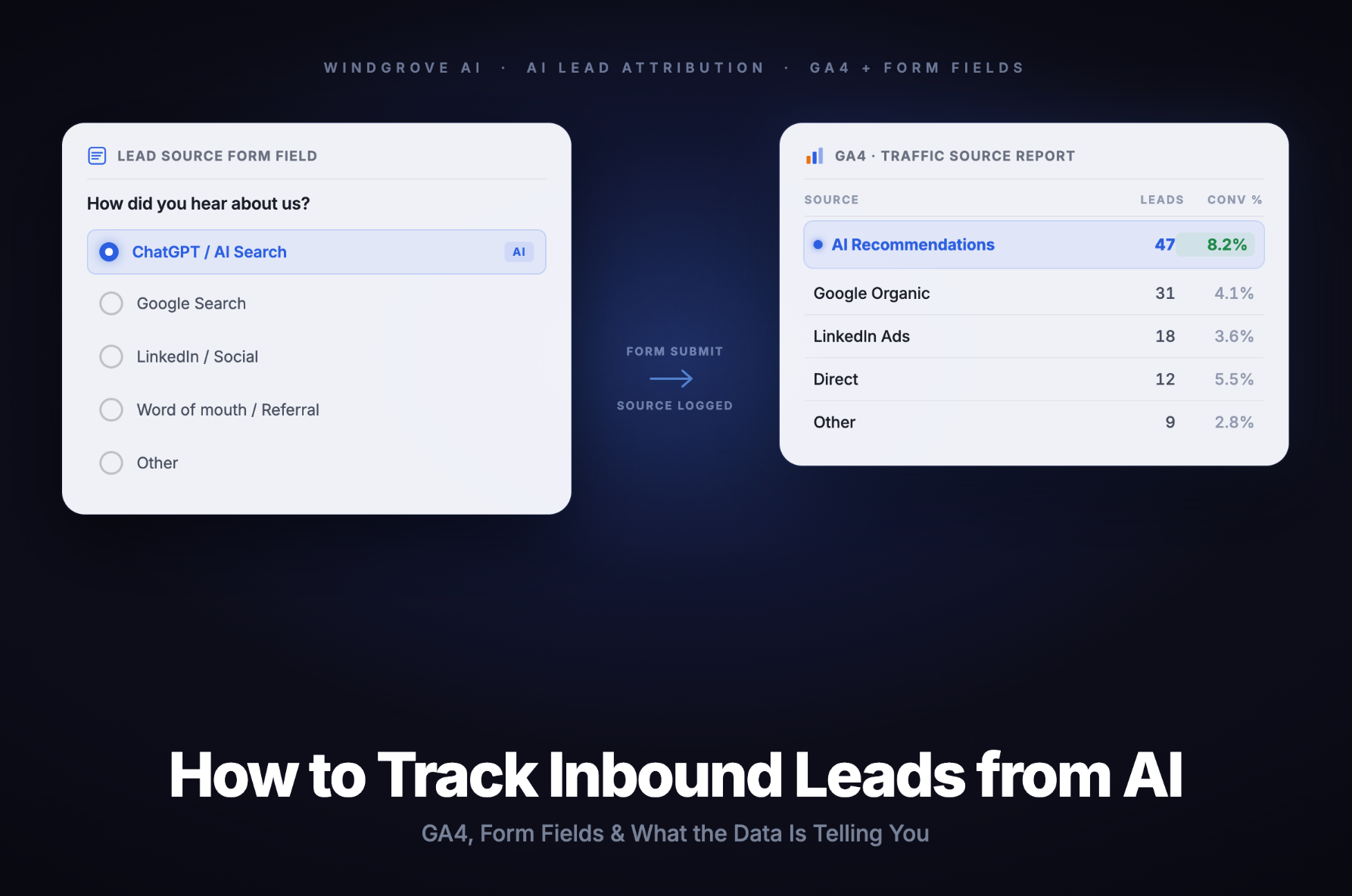
A simple "How did you find us?" field on your contact form, demo request page, or intake questionnaire captures attribution data that no analytics platform can. It also captures something more valuable: the exact language the lead used to find you.
How to Set It Up
Add a dropdown or free-text field to your primary lead forms. Keep it optional but prominent. Suggested dropdown options:
- Google search
- ChatGPT or another AI tool
- Perplexity
- Referral from a colleague
- Podcast or webinar
- Other
If you use a free-text field instead of a dropdown, you'll get more nuanced data. Leads will often write things like "ChatGPT recommended you" or "I asked Perplexity for the best [service] and you came up." That language is gold. It tells you exactly which queries are driving recommendations, which you can then use to optimize your content and positioning.
Connect the Data
Route form responses into your CRM and tag them by source. Over time, you'll be able to:
- Compare close rates between AI-referred leads and organic search leads
- Identify which AI platforms produce the highest-value customers
- Track whether your AI visibility efforts are translating into revenue, not just sessions
This is the attribution layer GA4 cannot provide. GA4 tells you someone arrived from ChatGPT. Your form field tells you what they asked ChatGPT to find them. Those are two different pieces of intelligence, and you need both.
The "Dark Traffic" Problem
A meaningful portion of AI-referred traffic will never show a referrer. Mobile app sessions, in-app browsers, and certain link-handling behaviours strip the referrer entirely. This traffic lands in your "Direct" bucket.
If you notice your "Direct" traffic converting at unusually high rates, especially for sessions with engagement patterns that don't look like branded searches (long session duration, multiple pages visited, direct navigation to your pricing or contact page), some of it is almost certainly AI-referred. The form field is the only reliable way to confirm it.
Step 4: Interpret the Data and Act on It
Tracking is only valuable if it changes what you do. Once your GA4 channel group and form field data are running, here's how to turn the numbers into decisions.
Benchmark Your AI Traffic Monthly
Set a recurring calendar reminder to review your AI Search channel data every 30 days. Track:
- Total sessions from AI sources (month-over-month trend)
- Conversion rate from AI traffic vs. organic search and direct
- Which AI platform is sending the most sessions
- Which pages AI-referred visitors land on and engage with most
If your AI traffic is growing but your conversion rate is low, the problem is likely on-page. AI engines are recommending you, but your landing experience isn't matching the intent of the recommendation. That's a fixable problem.
Identify Your Best-Performing AI Queries
From your form field data, look for patterns in how leads describe finding you. Group responses by:
- Platform mentioned (ChatGPT vs. Perplexity vs. Gemini)
- Query type (comparison queries, "best X for Y" queries, specific problem queries)
- Lead quality (did this lead close? what was the deal size?)
The queries that produce closed deals are the ones you need to own in AI responses. That means creating content that directly and authoritatively answers those exact questions.
Use AI Traffic Data to Justify Visibility Investment
This is the business case your leadership team needs. AI referral traffic is not a vanity metric. It is a measurable acquisition channel with documented conversion rates that outperform every other inbound source in most industries.
When you can show that AI-referred leads convert at 16% compared to 1.8% from Google, the conversation about investing in AI visibility shifts from "is this real?" to "how much should we allocate?"
Track this data from day one. Even if your current AI traffic volume is low, establishing the baseline now means you'll have the before/after comparison when your visibility investments compound.
Watch for the Compounding Effect
AI visibility compounds in a way that paid search does not. When your brand is consistently cited in AI responses, it builds a feedback loop: more citations lead to more training data exposure, which leads to more recommendations, which leads to more inbound traffic, which generates more brand signals that reinforce future citations.
The businesses that start tracking and optimizing now will have a structural advantage that is very difficult to close later.
What to Do This Week: Actionable Summary
If you read nothing else, do these five things.
1. Set up your GA4 channel group today. It takes 15 minutes. Use the regex in Step 1, drag AI Search to the top of the channel order, and you'll have clean data flowing within 48 hours. Every week you wait is a week of baseline data you'll never get back.
2. Pull your existing Referral report. Before your new channel group is populated, scan your current referral data for AI domains. You may already have months of ChatGPT or Perplexity traffic sitting in your analytics unnoticed.
3. Add "How did you find us?" to your primary lead form. One field. Optional. Dropdown or free-text. This single change will surface attribution data that no analytics platform can provide, including the exact queries driving recommendations.
4. Tag AI-sourced leads in your CRM. Once form responses start coming in, tag them by source. Track close rate, deal size, and time-to-close separately for AI-referred leads. The numbers will make the business case for you.
5. Review monthly and act on what you find. AI visibility is not set-and-forget. Check which platforms are growing, which pages AI-referred visitors engage with most, and which queries are producing closed deals. Build content around those queries. Repeat.
The businesses that build this infrastructure now will have a compounding advantage that is very difficult to close later. The ones that wait will be building from scratch in a more competitive landscape.
The Attribution Gap Is a Strategy Gap
Most businesses treat AI visibility as a brand awareness play. Something nice to have, hard to measure, and difficult to justify in a quarterly review.
The data tells a different story.
AI-referred visitors convert at rates that make every other inbound channel look ordinary. The problem has never been the channel's value. The problem has been attribution. Without a clean way to see AI traffic in your analytics, you cannot make the case for investing in it, and you cannot optimize what you cannot measure.
The GA4 channel group and the form field together close that gap. They give you the quantitative signal (sessions, conversions, revenue by AI source) and the qualitative signal (which queries, which platforms, which intent patterns). Used together, they build the business case for AI visibility as a core acquisition channel, not a side experiment.
The window to build this advantage is still open. Most of your competitors have not set up this tracking. Most have not asked their leads how they found them. Most are still treating AI recommendations as unmeasurable.
That's your edge. Use it.
Ready to see what AI engines are saying about your brand? Windgrove AI offers a free consultation to audit your current AI visibility, identify where you're being cited (and where you're being overlooked), and build a roadmap to compound your inbound from AI recommendations. Book your free call here and we'll show you exactly where you stand.
Frequently Asked Questions
1. Will the GA4 channel group capture all my AI traffic?
No, and it's important to understand why. When an AI platform strips the referrer header (common in mobile apps and certain in-app browsers), GA4 records the session as "Direct" with no source information. The custom channel group only captures sessions where the AI platform passes a referrer. In practice, this covers the majority of desktop AI traffic. Mobile traffic from AI apps is largely invisible to GA4, which is why the "How did you find us?" form field is an essential complement, not an optional add-on.
2. How do I know if my brand is actually being recommended by AI engines?
The most direct method is to test it yourself. Open ChatGPT, Perplexity, Claude, and Gemini and ask the kinds of questions your target buyers would ask. If your brand appears in the responses, you're being recommended. If it doesn't, you have an AI visibility gap. You can also monitor your GA4 referral data for AI domains appearing as traffic sources. A simpler signal: if leads are showing up in your form field data mentioning AI tools by name, your brand is in the conversation.
3. My AI traffic volume is very low. Is it worth tracking?
Yes, for two reasons. First, the conversion quality of AI-referred traffic is so high that even small volumes can represent meaningful revenue. A handful of AI-referred leads converting at 16% is worth more than hundreds of organic search visitors converting at 1.8%. Second, you need a baseline. AI referral traffic is growing fast. The businesses that establish clean tracking now will have comparative data that proves ROI when volume increases. Starting late means starting without context.
4. What's the difference between tracking AI traffic in GA4 and tracking AI visibility?
They measure different things. GA4 tracks the traffic that AI platforms send to your website, which requires a user to click a link in an AI response. AI visibility refers to whether your brand appears in AI-generated answers at all, including answers that don't include clickable links. Many AI responses recommend brands without linking to them directly. A user might read a ChatGPT recommendation, close the app, and search your brand name on Google. That session shows as organic branded search in GA4, not AI referral. Tracking both GA4 referrals and form field responses gives you a more complete picture, but neither captures 100% of the influence AI engines have on your inbound pipeline.
5. How do I get AI engines to recommend my brand more often?
AI engines recommend brands that appear authoritative, well-cited, and clearly relevant to the query. The core levers are: structured, authoritative content that directly answers the questions your buyers ask; consistent brand mentions across credible third-party sources; schema markup that makes your brand's expertise machine-readable; and a content strategy built around the specific queries where you want to appear. This is the discipline of Answer Engine Optimization (AEO). It's where Windgrove AI specializes. If you want a concrete assessment of where your brand stands in AI-generated answers, book a free consultation and we'll walk you through it.